
The COLUMNSPARKLINE have the following options:
|
Option |
Description |
|
Data |
A range reference that represents sparkline data. For example: A1:C3. |
|
DataOrientation |
A number that represents the sparkline data orientation, 0 is vertical, 1 is horizontal. |
|
DateAxisData |
A range reference that represents sparkline date axis data. For example: D1:F3. This setting is optional. |
|
DateAxisOrientation |
A number that represents the sparkline date axis orientation, 0 is vertical, 1 is horizontal. This setting is optional. |
|
Setting |
A string with JSON format. For example: " {axisColor:rgb(255,255,0),firstMarkerColor:brown,highMarkerColor:red,lastMarkerColor:blue,lowMarkerColor:green,markersColor:purple,negativeColor:yellowgreen,
|
The following table lists the JSON format string and the equivalent sparkline setting method or property.
|
Json Property |
SparklineSetting Method or Property |
|
AXISCOLOR |
axisColor() |
|
FIRSTMARKERCOLOR |
firstMarkerColor() |
|
HIGHMARKERCOLOR |
highMarkerColor() |
|
LASTMARKERCOLOR |
lastMarkerColor() |
|
LOWMARKERCOLOR |
lowMarkerColor() |
|
MARKERSCOLOR |
markersColor() |
|
NEGATIVECOLOR |
negativeColor() |
|
SERIESCOLOR |
seriesColor() |
|
DISPLAYEMPTYCELLSAS |
displayEmptyCellsAs |
|
RIGHTTOLEFT |
rightToLeft |
|
DISPLAYHIDDEN |
displayHidden |
|
DISPLAYXAXIS |
displayXAxis |
|
SHOWFIRST |
showFirst() |
|
SHOWHIGH |
showHigh() |
|
SHOWLAST |
showLast() |
|
SHOWLOW |
showLow() |
|
SHOWNEGATIVE |
showNegative() |
|
SHOWMARKERS |
showMarkers() |
|
MANUALMAX |
manualMax |
|
MANUALMIN |
manualMin |
|
MAXAXISTYPE |
maxAxisType |
|
MINAXISTYPE |
minAxisType |
|
LINEWEIGHT |
lineWeight |
Sample Usage
In order to use the COLUMNSPARKLINE formula, start with your edited Excellentable:
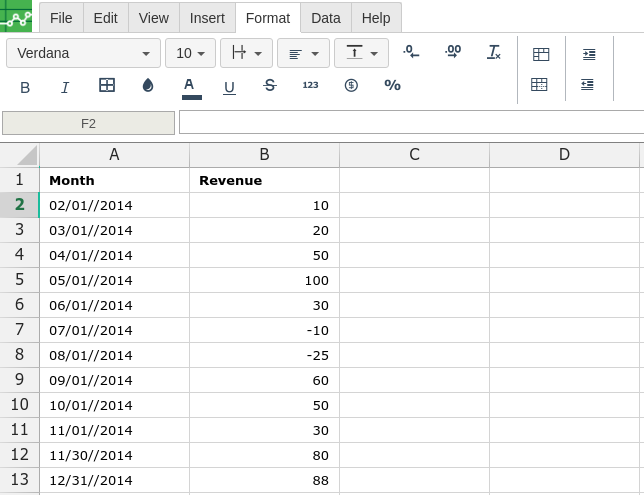
Then type in the COLUMNSPARKLINE formula in the area you would like to display the outcome:
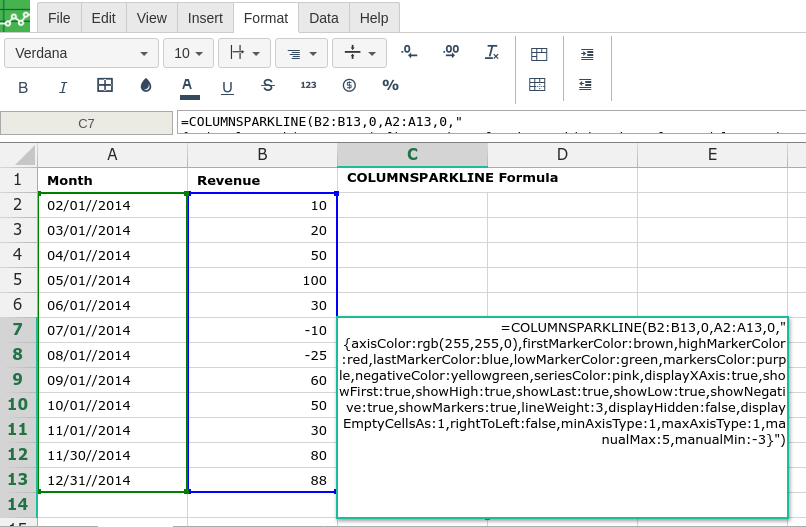
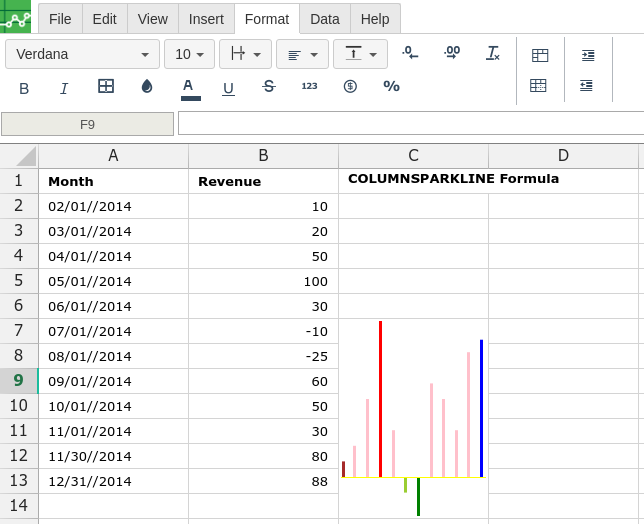
By adding the values you would like to calculate the COLUMNSPARKLINE formula for, Excellentable will generate the outcome:
There were errors rendering macro:
- An unknown error occurred.