
Definition
Estimates standard deviation based on a sample (ignores logical values and text in the sample).
The standard deviation is a measure of how widely values are dispersed from the average value (the mean).
Sample Usage
Syntax
STDEV.S(number1,[number2],...)
The STDEV.S function syntax has the following arguments:
-
Number1 Required. The first number argument corresponding to a sample of a population. You can also use a single array or a reference to an array instead of arguments separated by commas.
-
Number2, ... Optional. Number arguments 2 to 254 corresponding to a sample of a population. You can also use a single array or a reference to an array instead of arguments separated by commas.
Remarks
-
STDEV.S assumes that its arguments are a sample of the population. If your data represents the entire population, then compute the standard deviation using STDEV.P.
-
The standard deviation is calculated using the "n-1" method.
-
Arguments can either be numbers or names, arrays, or references that contain numbers.
-
Logical values and text representations of numbers that you type directly into the list of arguments are counted.
-
If an argument is an array or reference, only numbers in that array or reference are counted. Empty cells, logical values, text, or error values in the array or reference are ignored.
-
Arguments that are error values or text that cannot be translated into numbers cause errors.
-
If you want to include logical values and text representations of numbers in a reference as part of the calculation, use the STDEVA function.
-
STDEV.S uses the following formula:

where x is the sample mean AVERAGE(number1,number2,…) and n is the sample size.
In order to use the STDEV.S formula, start with your edited Excellentable
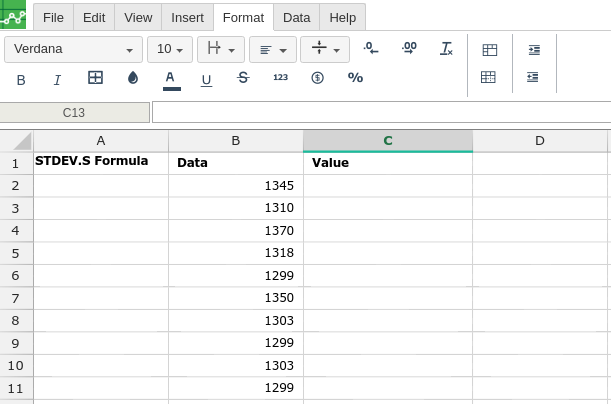
Then type in the STDEV.S formula in the area you would like to display the outcome:
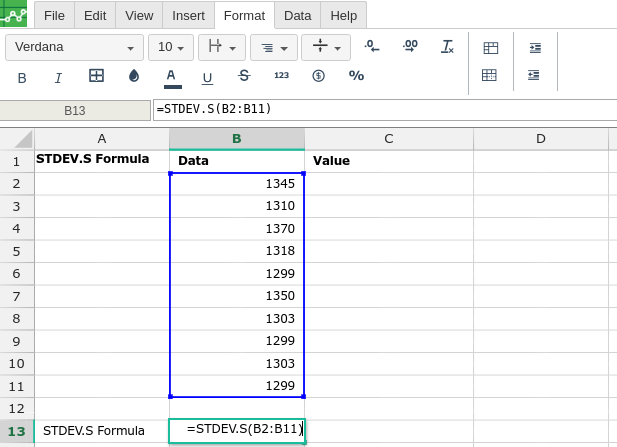
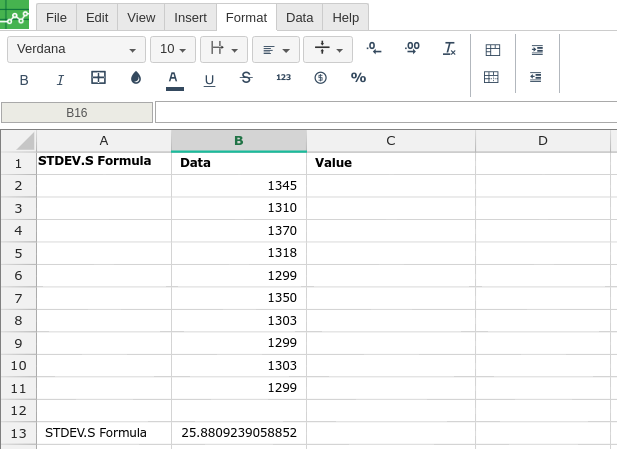
By adding the values you would like to calculate the STDEV.S formula for, Excellentable will generate the outcome:
There were errors rendering macro:
- An unknown error occurred.